| Server IP : 34.87.99.72 / Your IP : 216.73.217.31 Web Server : Apache/2.4.46 (Unix) OpenSSL/1.1.1n System : Linux zlock-bitnami-lamp-prod-v2-vm 4.19.0-16-cloud-amd64 #1 SMP Debian 4.19.181-1 (2021-03-19) x86_64 User : bitnami ( 1000) PHP Version : 7.4.18 Disable Function : NONE MySQL : OFF | cURL : ON | WGET : ON | Perl : ON | Python : ON | Sudo : ON | Pkexec : OFF Directory : /opt/bitnami/apache/htdocs/app/node_modules/vuejs-clipper/ |
Upload File : |
# vuejs-clipper
Vue.js image clipping components using Vue-Rx.
[](https://www.npmjs.com/package/vuejs-clipper)
[](https://travis-ci.org/timtnleeProject/vuejs-clipper#)
* Add image clipping components to your Vue application in nothing flat.
* Touch devices supported and fully responsive.
## Demo/Document
You can find the source code of examples under the `examples` branch.
* [Live demo & examples](https://timtnleeproject.github.io/vuejs-clipper)
* [Quick Start](https://timtnleeproject.github.io/vuejs-clipper/#/examples/quick-start)
* [Try it on codepen](https://codepen.io/timtnlee/pen/vzzqRM)
* [README](https://github.com/timtnleeProject/vuejs-clipper#vuejs-clipper)
* [vuejs-clipper wiki](https://github.com/timtnleeProject/vuejs-clipper/wiki)
## Table of Contents
* [Notice](#notice)
* [Installation (NPM & ESM)](#installation-npm--esm)
* [Installation (Script)](#installation-script)
* [Components](#components)
* [Changelog](#changelog)
## Notice
**Before using the plugin & components, here's something you should know:**
* It's based on [**vue-rx**](https://github.com/vuejs/vue-rx).
* [**rxjs**](https://github.com/ReactiveX/rxjs/tree/6.x) and [**vue-rx**](https://github.com/vuejs/vue-rx) are required as peer dependencies.
* Components are responsive base on **width** instead of height, see [Component Layout](https://github.com/timtnleeProject/vuejs-clipper/wiki/Component-layout).
* You can clip your images (local uploaded images or images served on your site), but you cannot clip a cross-origin image unless the image server sets the CORS headers.
* Components' **input** is an image URL, **output** is a canvas element, they only help you clip images to canvas, you need to handle other things like *transform file input to image URL* or *transform output canvas to image* by yourself.
* If you set the clipper to be *responsive*, for example: put it in a `Row, Col` system or set its width based on the container's width, *you will lose a little bit of precision*. The result of the clipper and the clip box position might not be that accurate. If you cannot tolerate the slippage, use fixed width `${width + border*2}px` on the clipper component like `width: 502px`.
## Installation (NPM & ESM)
Install vuejs-clipper
```bash
npm install vuejs-clipper --save
```
Install peer dependencies if you haven't.
```bash
npm install vue-rx rxjs --save
```
Vuejs-clipper is based on **vue-rx**, so make sure you have the vue-rx plugin installed.
```javascript
import Vue from 'vue'
import VueRx from 'vue-rx'
// install vue-rx
Vue.use(VueRx)
```
Make sure to install **vue-rx** plugin first.
### Import
#### use dist files
```javascript
import Vue from "vue";
import VueRx from "vue-rx";
// Use build files
import VuejsClipper from "vuejs-clipper/dist/vuejs-clipper.umd";
import "vuejs-clipper/dist/vuejs-clipper.css";
Vue.use(VueRx);
Vue.use(VuejsClipper);
```
#### use vuejs-clipper soruce
You are using `vuejs-clipper` directly with your build process(webpack etc).
So make sure you have css loader, ex: `sass-loader` if you haven't installed :
```bash
npm install -D sass-loader node-sass
```
```javascript
import Vue from 'vue'
import VueRx from 'vue-rx'
import VuejsClipper from 'vuejs-clipper'
// install vue-rx
Vue.use(VueRx)
// install vuejs-clipper
Vue.use(VuejsClipper)
```
### Config
By default vuejs-clipper plugin will register **all components** to Vue global scope.
register some components to global with default component name
```javascript
Vue.use(VuejsClipper, {
components: {
clipperBasic: true,
clipperPreview: true
}
})
```
with the customized component name
```javascript
Vue.use(VuejsClipper, {
components: {
clipperBasic: 'image-clipper-basic',
clipperPreview: 'my-preview'
}
})
```
not register any components, but with some plugin options
```javascript
Vue.use(VuejsClipper, {
components: null,
parentPropName: 'myCustomerName'
/*
parentPropName:
Vuejs-clipper Adds property to Vue instance in order to store `clipper-preview` list.
You can change the property name
default: '_imgPreviewLists'
*/
})
```
#### separately import components (need css loader)
```javascript
import Vue from 'vue'
import VueRx from 'vue-rx'
// install vue-rx
Vue.use(VueRx)
```
then import in your components (SFC)
```javascript
import { clipperBasic, clipperPreview } from 'vuejs-clipper'
export default {
components: {
clipperBasic,
clipperPreview
}
}
```
## Installation (Script)
Include vuejs-clipper umd script after Vue.js.
```html
<!-- rxjs-->
<script src="https://unpkg.com/rxjs/bundles/rxjs.umd.js"></script>
<!--vue-->
<script src="https://cdn.jsdelivr.net/npm/vue@2.5.17/dist/vue.js"></script>
<!-- vue-rx-->
<script src="https://unpkg.com/vue-rx@6.2.0/dist/vue-rx.js"></script>
<!--vuejs-clipper script & style -->
<script src="./dist/vuejs-clipper.umd.min.js"></script>
<link rel="stylesheet" href="./dist/vuejs-clipper.css">
```
Use in html/template
```html
<clipper-basic src="example.jpg"></clipper-basic>
```
## Components
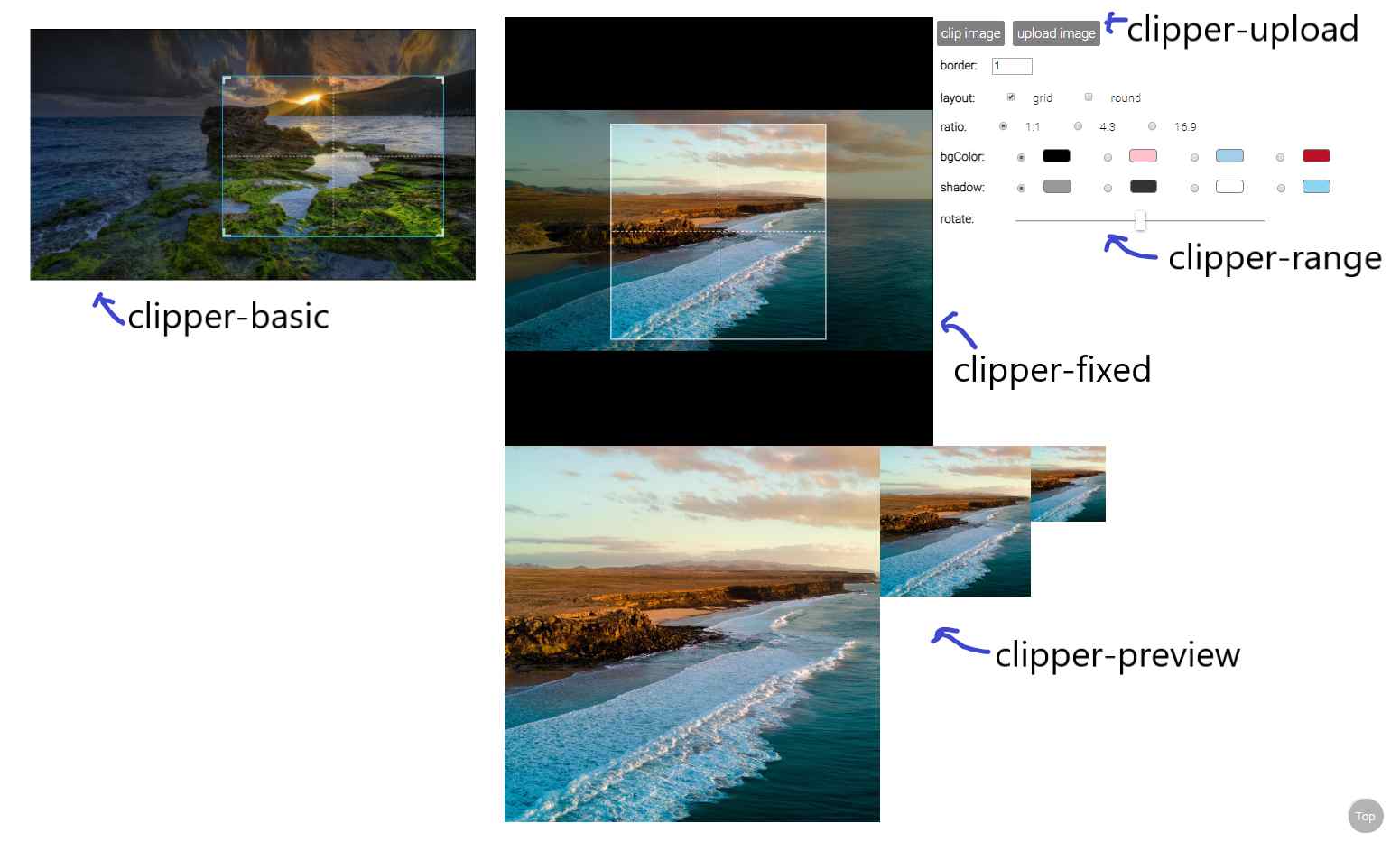
* [clipperBasic](#clipper-basic)
* [clipperFixed](#clipper-fixed)
* [clipperPreview](#clipper-preview)
* [clipperUpload](#clipper-upload)
* [clipperRange](#clipper-range)
See detail [examples](https://timtnleeproject.github.io/vuejs-clipper/#/examples).
### clipper-basic
an image clipping component
```javascript
import { clipperBasic } from 'vuejs-clipper'
```
* Props
|Prop|Type|default|description|
|--------|-------:|------:|:-----|
| src | string| | image src |
| preview| string | | matches `clipper-preview`'s name to show preview image.|
| border | number| 1 | border width |
| outline| number | 6 | outlines near by the border to help user zooming. |
| corner | boolean| true | show corner layout |
| grid | boolean| true | show grid layout|
| ratio | number | | ratio of clipping area (width/height). ex: `1`, `4/3` .|
| wrap-ratio | number | NaN |ratio of clipping container (width/height). ex: `1`, `4/3` .|
| mode | 'normal'/'switch' | 'normal' | if ratio is set, this prop will affect how clipping area zoom.|
|bg-color |string | 'white' | background color|
|lineColor|string|'#1baae8'|clip box line color|
|shadow|string|'rgba(0,0,0,0.4)'|shadow color|
|rotate | number | 0 | rotate degree |
|scale | number | 1 | transform scale |
|min-width|number|1|minimum width(%) of clipping box related to clipping component's width|
|min-height|number|1|minimum height(%) of clipping box related to clipping component's height.|
|init-width|number|50|clipping area's width(%) when the image loaded.|
|init-height|number|50|clipping area's height(%) when the image loaded.|
|touch-create| boolean | true | enable/disable create new clipping area on touch device |
|cross-origin|string|undefined|`crossorigin` attribute of `<img />` inside clipper. ex: `anonymous`|
For more detail about the layout settings, pleases see [Component layout in depth](https://github.com/timtnleeProject/vuejs-clipper/wiki/Component-layout-in-depth).
* Methods
| method | argument | return| description |
|-|-|-|-|
| clip | options | canvas element |get clipping canvas element|
|getDrawPos||`{pos, translate}`: positions and transformation|get result canvas information|
`clip()` arguments
[Resulting-canvas-size](https://github.com/timtnleeProject/vuejs-clipper/wiki/Resulting-canvas-size)
|name|type|default|description|
|-|-|-|-|
|options.wPixel|number|undefined|Set the the width (pixel) of result canvas.|
|options.maxWPixel|number|undefined|Set the the maximum width (pixel) of result canvas.|
set ref to use component methods
```html
<clipper-basic ref="clipper" />
```
in your Vue instance methods
```javascript
const canvas = this.$refs.clipper.clip()
```
* Event
|event|parameters|description|
|-|-|-|
|load|$event|image onload|
|error|$error|image onerror|
usage :
```html
<clipper-basic @error="errorCb" @load="loadCb" />
```
* Data
|data |type | default|description|
|-|-|-|-|
|imgRatio|number|NaN|upload image's ratio (image naturalWidth/natrualHeight). Default value is NaN, after the load event the value will be set.|
|zoomTL$|object||clipping area's position(%), can be top/bottom and left/right.|
|zoomWH$|object||clipping area's width and height(%)|
usage :
```javascript
this.$refs.clipper.imgRatio
this.$refs.clipper.zoomWH$.width
```
* Slot
|slot|description|
|-|-|
|placeholder|if no `src` provided, show placeholder|
```html
<clipper-basic src="">
<div slot="placeholder">No image</div>
</clipper-basic>
```
* rxjs Subject
|subject|description|
|-|-|
|setTL$|Set the position of the zooming area.|
|setWH$|Set the width and height of the zooming area.|
|onChange$|Subject that subscribes to zooming, moving, and rotating subjects.|
usage:
```javascript
this.$refs.clipper.setTL$.next({ left: 0, top: 0 }) // percentage 0%
this.$refs.clipper.setTL$.next({ right: 0, bottom: 10 })
this.$refs.clipper.setWH$.next({ width: 100, height: 100 }) // percentage 100%
this.$refs.clipper.onChange$.subscribe(() => {
// This happens whenever zooming, moving, and rotating occur.
})
```
### clipper-fixed
an image clipping component
```javascript
import { clipperFixed } from 'vuejs-clipper'
```
* Props
| Prop | Type |default|description |
|:--------|-------:|------:|:-----|
| src | string| | image src |
| preview| string | | matches `clipper-preview`'s name to show preview image.|
| ratio | number | 1 | ratio of clipping area (width/height). ex: `1`, `4/3` .|
| zoom-rate| number | 0.04 | zooming faster if this value is larger|
|min-scale | number| 0.1 | minimum transform scale |
| border | number| 1 | border width |
|border-color|string|'white'|border color|
| grid | boolean| true | show grid layout|
| round | boolean | false | Use a round clipping area, this only effect the component layout, clipping results are still rectangular. |
| bg-color |string | 'white' | background color|
|shadow|string|'rgba(0,0,0,0.4)'|shadow color|
|rotate | number | 0 | rotate degree |
| area | number | 50 | width or height (%) of clipping box(depends on ratio). |
|cross-origin|string|undefined|`crossorigin` attribute of `<img />` inside clipper. ex: `anonymous`|
|handle-zoom-event|function|`(scale) => scale`|handle zooming, accept the calculated scale value, return the scale value.|
* Method
| method | argument | return| description |
|-|-|-|-|
| clip | options | canvas element |get clipping canvas element.|
|getDrawPos||`{pos, translate}`: positions and transformation|get result canvas information|
`clip()` arguments
|name|type|default|description|
|-|-|-|-|
|options.wPixel|number|undefined|Set the the width (pixel) of result canvas.|
|options.maxWPixel|number|undefined|Set the the maximum width (pixel) of result canvas.|
* Event
|event|parameters|description|
|-|-|-|
|load|$event|image onload|
|error|$error|image onerror|
* Data
|data |type | default|description|
|-|-|-|-|
|imgRatio|number|NaN|upload image's ratio (image naturalWidth/natrualHeight). Default value is NaN, after the load event the value will be set.|
|bgTL$|object||image's translate(X,Y)|
|bgWH$|number||image's scaling|
* Slot
|slot|description|
|-|-|
|placeholder|if no `src` provided, show placeholder|
* rxjs Subject
|subject|description|
|-|-|
|setTL$|Set the top and left of the image.|
|setWH$|Set the sizing(scaling) of the image.|
|onChange$|Subject that subscribes to zooming, moving, and rotating subjects.|
usage:
```javascript
this.$refs.clipper.setTL$.next({ left: 50, top: 50 }) // percentage 0%
this.$refs.clipper.setWH$.next(0.6) // transform scale(0.6)
this.$refs.clipper.onChange$.subscribe(() => {
// This happens whenever zooming, moving, and rotating occur.
})
```
### clipper-preview
preview clipping result
```javascript
import { clipperPreview } from 'vuejs-clipper'
```
* Props
| Prop | Type |default|description |
|--------|-------:|------:|:-----|
| name | string | | name that matches clipper component's preview property |
* Slot
|slot|description|
|-|-|
|placeholder|if no `src` provided, show placeholder|
### clipper-range
a simple input range component
```javascript
import { clipperRange } from 'vuejs-clipper'
```
use `v-model` binding data with `clipper-range`
* Props
| Prop|Type|default|description |
|--------|-------:|------:|:-----|
| max | number | 10 | maximum value of range |
| min | number | 0 | minimum value of range |
### clipper-upload
a new component in 0.2.0
an upload button that transforms image files to URL
```javascript
import { clipperUpload } from 'vuejs-clipper'
```
use `v-model` binding data with `clipper-upload`
* Props
Props that are not defined below will apply to the file input as attributes, for example: `accept`, `id`, and `name`.
| Prop|Type|default|description |
|-|-:|-:|:-|
|check|boolean|true|Check if upload file is an image. If set to `true`, when upload files that are not images, it will do nothing, so you will not get an error event on the clipping component.|
|exif|boolean|true|Transform EXIF image to correct orientation when uploading.|
* Event
|event|parameters|description|
|-|-|-|
|input|$event|Result domgstring on change|
* Data
|data|type|default|description|
|-|-|-|-|
|file|File Object|null|Uploaded file's original File Object.|
## Changelog
* 3.1.2
* Fix touch devices zooming bug: [#91](https://github.com/timtnleeProject/vuejs-clipper/issues/91)
* 3.1.1
* Fix [#82](https://github.com/timtnleeProject/vuejs-clipper/issues/82)
* 3.1.0
* Fix `clipper-basic` ratio is not correct.
> !Before v3.1.0, `clipper-basic` with `ratio` prop has a bug that the clip area is not calculated correctly with `border` prop, so the ratio of the clipping result isn't precise. (issue [#80](https://github.com/timtnleeProject/vuejs-clipper/issues/80))
* 3.0.4
* `clipper-upload` accept rest props as input attributes.
* 3.0.3
* Feature: Add `handleZoomEvent` to `clipper-fixed` for controlling zoom behavior. (issue [#54](https://github.com/timtnleeProject/vuejs-clipper/issues/54)
* 3.0.2
* Fix: move clipper-basic init/reset position function into `$nextTick` (issue [#71](https://github.com/timtnleeProject/vuejs-clipper/issues/71))
* 3.0.1
* Fix clipper-basic initalize ratio clip-box & wrong border layout.
* 3.0.0
* Move `rxjs`, `vue-rx` from dependencies to peer dependencies.
---
* 2.1.2
* Fix `clipper-basic` incorrect layout for scaling & rotation (bug of 2.1.1).
* 2.1.1
* Fix `clipper-basic` incorrect layout for verticle images on Firefox.
* 2.1.0
* Fix broken `wrap-ratio`.
* 2.0.0
* Change css naming to BEM.
---
* 1.1.6
* Update dependencies.
* 1.1.5
* Add new prop `area` for `clipper-fixed`.
* 1.1.4
* Add `crossorigin` attribute biding for `<img/>` in clipper (`crossOrigin` prop).
* 1.1.3
* Add `!important` statements to components' style.
* 1.1.2
* Set pixel of `clip` result canvas. `clip({ wPixel, maxWPixel })`
* 1.1.1
* Add `clipper-fixed` placeholder slot.
* 1.1.0
* Fixed `clipper-basic` props `ratio` and `wrapRatio` behaviors, now `ratio` will not affect clipper's layout since there's `wrapRatio` to control the layout.
* 1.0.1
* Fixed `clipper-fixed` loading images overflow.
* Add `wrapRatio`, `initWidth` and `initHeight` props to `clipper-basic`
* 1.0.0
* Change the `clipper-basic` design, it will judge layout depends on the ratio.
* Production version.
---
* 0.2.13
* Decrease css specificity
* 0.2.12
* Fixed [issue #13][issue13]
* 0.2.11
* Expose rxjs subjects that can [set position and layout of the movable area](https://timtnleeproject.github.io/vuejs-clipper/#/examples/set-layout).
* 0.2.10
* Use passive event listener on wheel event ([issue #8][issue8]).
* 0.2.9
* New prop `border-color` for `clipper-fixed`
* Fixed [issue #4][issue4]
* 0.2.8
* New prop `accept` for `clipper-upload` ([issue #1][issue1])
* Add EXIF image transformation feature to clipper-upload ([issue #2][issue2])
[issue1]:https://github.com/timtnleeProject/vuejs-clipper/issues/1
[issue2]:https://github.com/timtnleeProject/vuejs-clipper/issues/2
[issue4]:https://github.com/timtnleeProject/vuejs-clipper/issues/4
[issue8]:https://github.com/timtnleeProject/vuejs-clipper/issues/8
[issue13]:https://github.com/timtnleeProject/vuejs-clipper/issues/13